In my last post, I went over the configuration of Proxmox, Vyos, and SROS. Here I want to show over how the setup looks and works with real VMs attached to this.
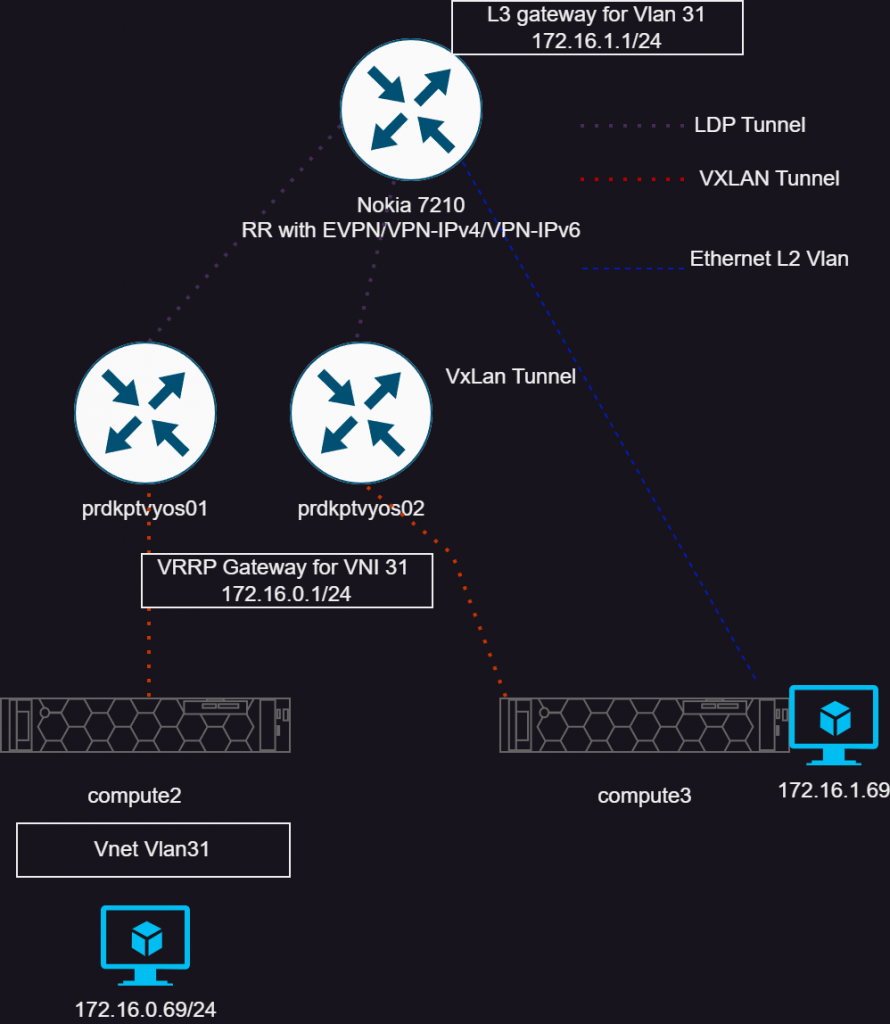
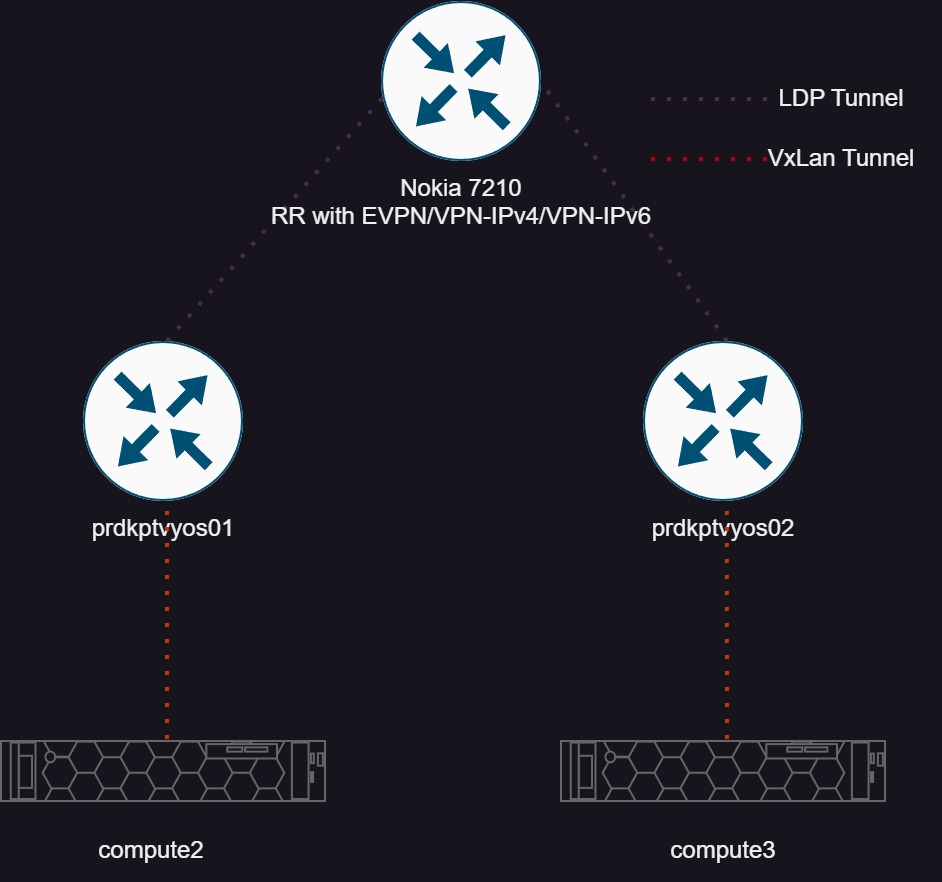
Above I have tried to show the topology. The VM in the bottom left is running on compute2 (Proxmox hypervisor), and attached to the VNET “Vlan31” which has the IP of 172.16.0.69. This VM’s gateway exists on the pair of Vyos instances, which tie the VXLAN tunnel into a VRF. The other VM, 172.16.1.69, is attached to a normal Proxmox bridge/vlan that is routed on the 7210 within the VPRN service. So these VMs are just to show connectivity between these systems.
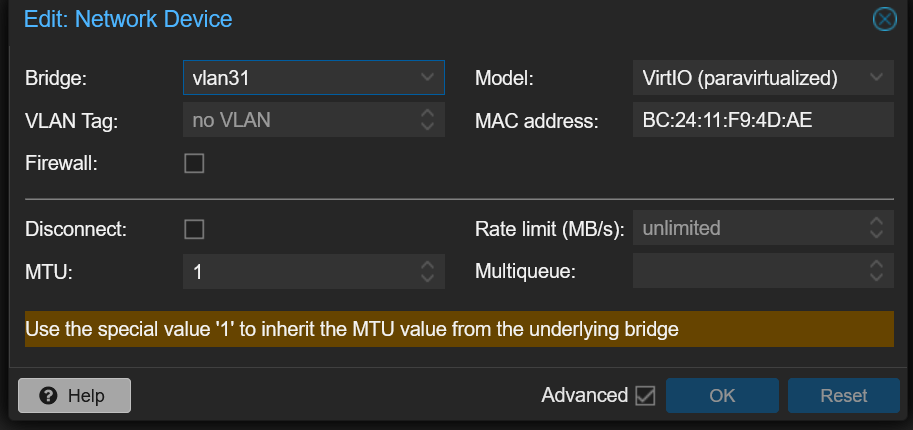
With the Vnet configured in Proxmox, it is possible to assign that to a VM’s interface. Which simply looks like this below:
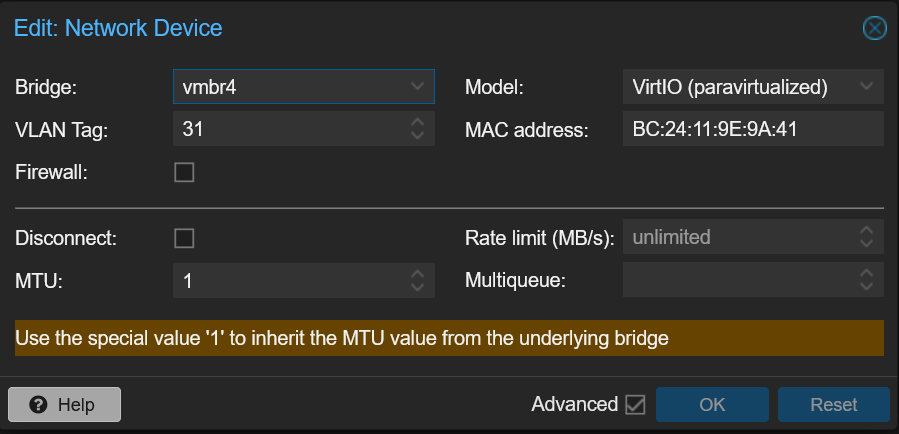
The other VM, I’m simply using a traditional linux bridge, and a vlan.
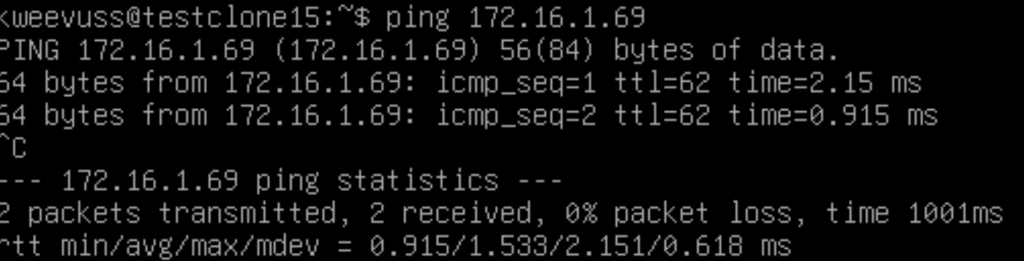
The VM above is the 172.16.0.69 VM, and showing connectivity to the other VM on 1.69. Let’s dive in how it works.
First I will lay out the IPs and macs for reference.
172.16.0.69 (testclone15)
BC:24:11:F9:4D:AE
172.16.1.69 (testclone16)
BC:24:11:9E:9A:41
First we can look at the EVPN type 2 route (mac address) for the first host.
A:KPTPE01# show router bgp routes evpn mac mac-address BC:24:11:F9:4D:AE
===============================================================================
 BGP Router ID:10.11.0.2        AS:65000       Local AS:65000
===============================================================================
 Legend -
 Status codes  : u - used, s - suppressed, h - history, d - decayed, * - valid
                 l - leaked, x - stale, > - best, b - backup, p - purge
 Origin codes  : i - IGP, e - EGP, ? - incomplete

===============================================================================
BGP EVPN MAC Routes
===============================================================================
Flag  Route Dist.         MacAddr           ESI
      Tag                 Mac Mobility      Ip Address
                                            NextHop
                                            Label1
-------------------------------------------------------------------------------
*>i   192.168.254.18:2    bc:24:11:f9:4d:ae ESI-0
      0                   Seq:0             N/A
                                            192.168.254.18
                                            VNI 31
And we see it as we expect on the SROS router. We have the mac address, the VNI it’s attached to and the next hop which will be the interface on compute2 (Proxmox hypervisor).
vyos@devkptvyos02:~$ show evpn mac vni all

VNI 31 #MACs (local and remote) 4

Flags: N=sync-neighs, I=local-inactive, P=peer-active, X=peer-proxy
MAC               Type   Flags Intf/Remote ES/VTEP            VLAN  Seq #'s
d0:99:d5:5a:c8:ec remote       192.168.254.137                      0/0
ea:89:3c:f0:86:82 local        br1                            1     0/0
86:a8:39:b4:ec:43 remote       192.168.254.137                      0/0
bc:24:11:f9:4d:ae remote       192.168.254.18                       0/0
Then on Vyos, we can see the mac address of the VM is learned. This is because SROS is sending the EVPN route to the Vyos instances, and it installs it in it’s table. The gateway which is 172.16.0.1 that exists within our vrf called “test-vprn” has a mac of ea:89:3c:f0:86:82
Now the packet will route to the gateway, and Vyos will look in it’s route table on how to get to 172.16.1.0/24.
vyos@devkptvyos02:~$ show ip route vrf test-vprn
Codes: K - kernel route, C - connected, S - static, R - RIP,
       O - OSPF, I - IS-IS, B - BGP, E - EIGRP, N - NHRP,
       T - Table, v - VNC, V - VNC-Direct, A - Babel, F - PBR,
       f - OpenFabric,
       > - selected route, * - FIB route, q - queued, r - rejected, b - backup
       t - trapped, o - offload failure

VRF test-vprn:
C>* 172.16.0.0/24 is directly connected, br1, 6d12h41m
B>  172.16.1.0/24 [200/0] via 10.11.0.2 (vrf default) (recursive), label 131056, weight 1, 01:48:05
  *                         via 10.0.0.8, eth1.34 (vrf default), label 131071/131056, weight 1, 01:48:05
Now Vyos has a route using a MPLS transport and service label to the SROS router.
Lastly on the Nokia router, it will simply deliver it over vlan 31.
A:KPTPE01# show router 231 route-table

===============================================================================
Route Table (Service: 231)
===============================================================================
Dest Prefix[Flags]                            Type    Proto     Age        Pref
      Next Hop[Interface Name]                                    Metric
-------------------------------------------------------------------------------
172.16.0.0/24                                 Remote  BGP VPN   01h54m38s  170
       10.11.0.140 (tunneled)                                       0
172.16.1.0/24                                 Local   Local     11d08h37m  0
       vlan31                                                       0
-------------------------------------------------------------------------------
No. of Routes: 3
Flags: n = Number of times nexthop is repeated
       B = BGP backup route available
       L = LFA nexthop available
       S = Sticky ECMP requested
===============================================================================
A:KPTPE01#
At this point, we can see some of what the traffic looks like on the network. I am capturing from “compute2” for anything with the port 4789 for VXLAN.
tcpdump -i any port 4789
13:43:29.824872 enp4s0 Out IP 192.168.254.18.53966 > 192.168.254.140.4789: VXLAN, flags I, vni 31 IP 172.16.0.69 > 172.16.1.69: ICMP echo request, id 3, seq 9, length 64 <– Inner
13:43:30.827019 enp4s0 In IP 192.168.254.140.52047 > 192.168.254.18.4789: VXLAN, flags I, vni 31 IP 172.16.1.69 > 172.16.0.69: ICMP echo reply, id 3, seq 10, length 64 <– Inner
So we can see the VM 172.16.0.69 sending a ping request to 172.16.1.69. That packet is encapsulated in VXLAN, and send from the Proxmox IP to Vyos. We also see the return, also encapsulated in VXLAN.
So of course, doing this all with two hosts in a single network isn’t all that useful per say. But imagine having many hosts, and even those hosts not being in the same area, that can support being on the same L2 network and mobility. Although stretching L2 across WANs is not always the best idea, but I’ll leave that up to your discretion 🙂
With Proxmox 8, and production support of software defined networking, I started to take a harder look at what is possible.
From my understanding, this feature is built on FRR. In this blog, I am looking to take an unconventional approach at using this. From the Proxmox documentation, most of what this feature seems to be used for is networking nodes together which could be over a WAN etc. There are limited options that are available in the GUI, which of course is all you need for this feature to work. I wanted to see what was happening under the hood, and expand on this by having networking features outside of just the hosts too.
Ideally, my setup would consist of VXLAN tunnels terminating on a router, where I have a layer 3 gateway within a VRF. Problem is, while the 7210 supports EVPN, it only supports transport over EVPN-MPLS. Most every opensource project that I have found only supports VXLAN. So my idea was then to use Vyos in the middle, which can terminate the VXLAN tunnels from the Proxmox nodes, and then route from a VRF, to another VRF on the 7210 via MPLS.
Topology
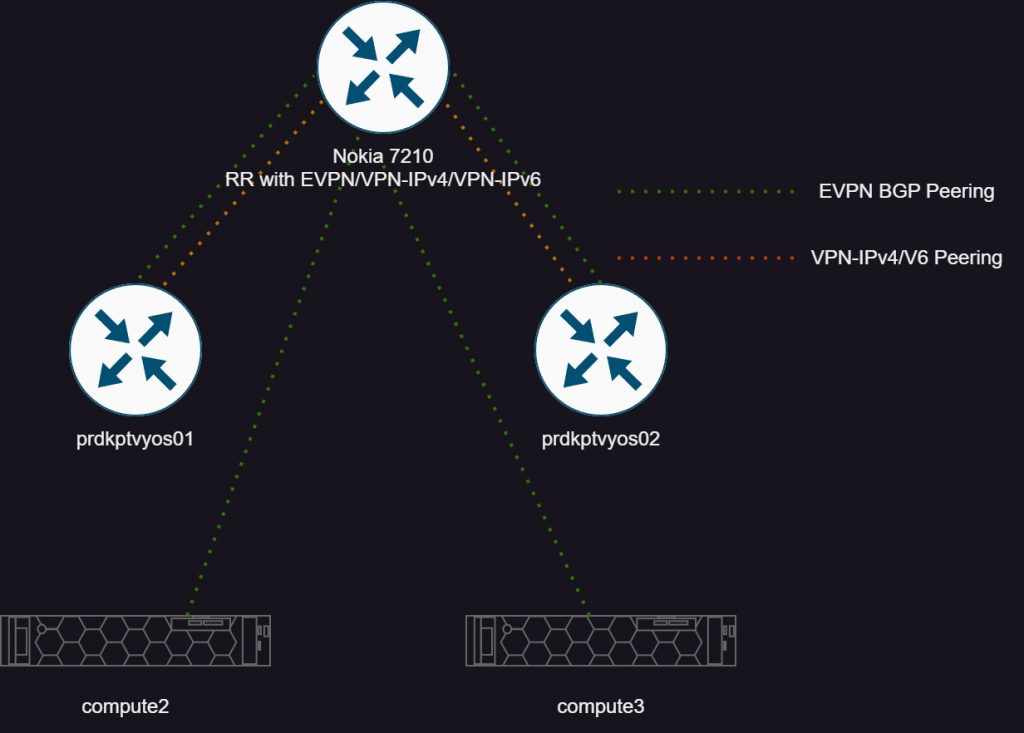
The first picture I’m depicting the control plane of this setup. I am using a Nokia 7210 as a route reflector with several different address families. EVPN for the Proxmox nodes, and EVPN/VPN-IPv4/v6 towards Vyos. More on VPN-IPv6 though, as sadly ran into some unresolved issues.
The second pictures shows the transport tunnels. Simply, VXLAN from Proxmox to Vyos ( It would be full mesh, I neglected to draw it here) and LDP tunnels to the 7210.
Proxmox Configuration
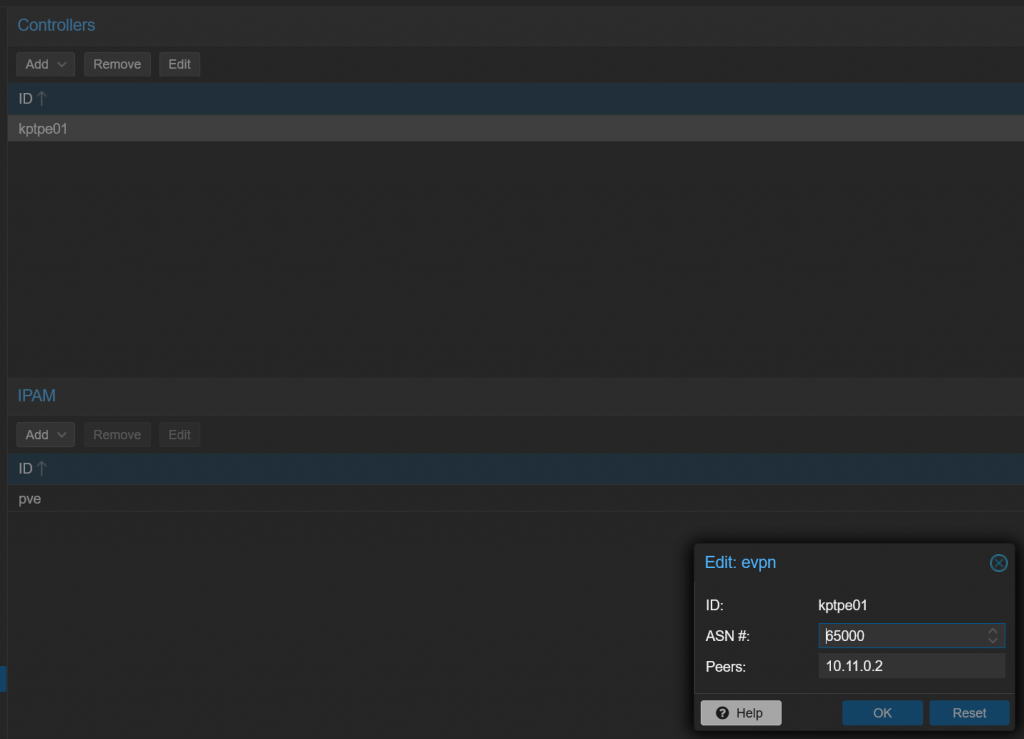
There are some prerequisites that are all covered in the Proxmox documentation in chapter 12. All of these settings are under Datacenter >SDN. First let’s setup a “controller” which is really just defining an external router which will run the EVPN protocol. Under options, add a EVPN controller.
Here simply give it a name, ASN, and peer IP. Then on my router config, I defined a peer group and a cluster id, which means this peer group will act as a route reflector:
A:KPTPE01>config>router>bgp# info
----------------------------------------------

            group "iBGP-RR"
                family ipv4 vpn-ipv4 evpn
                cluster 10.11.0.2
                peer-as 65000
                advertise-inactive
                bfd-enable
                neighbor 192.168.254.13
                    description "compute3"
                exit
                neighbor 192.168.254.18
                    description "compute2"
                exit
            exit
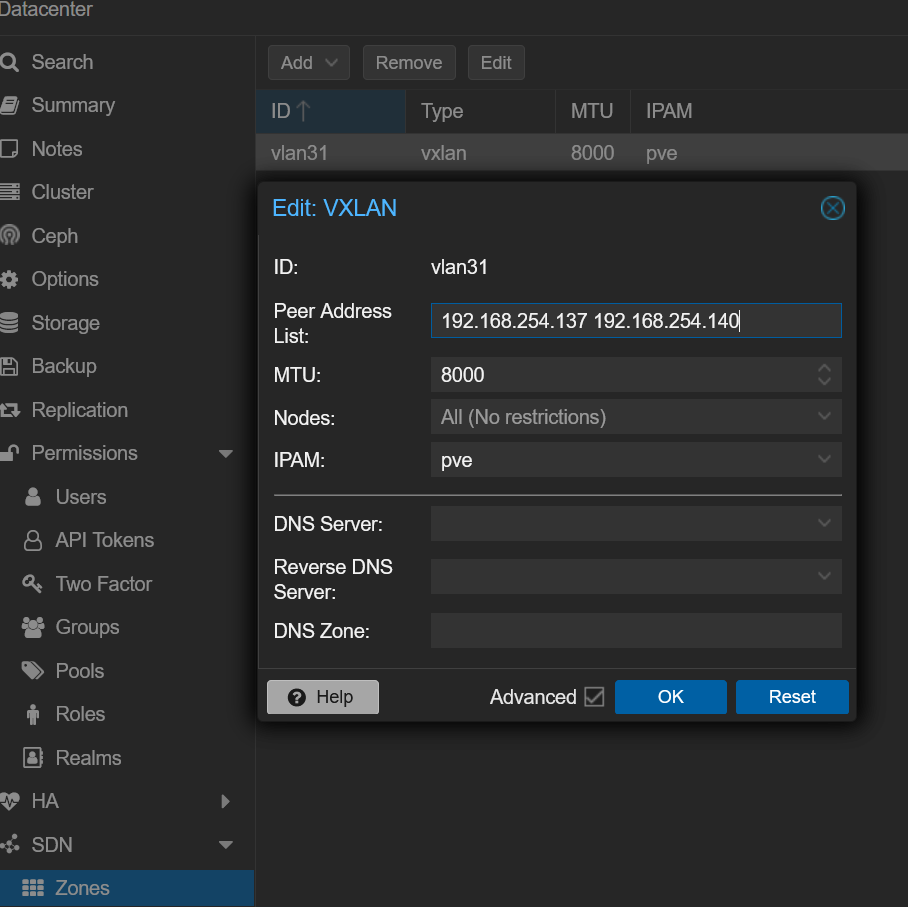
Next, need to define a zone. Proxmox gives this as a definition of “A zone defines a virtually separated network. Zones are restricted to specific nodes and assigned permissions, in order to restrict users to a certain zone and its contained VNets.” In my case, I’m using this to define the vxlan tunnel, and it’s endpoints, which end up being my two vyos instances.
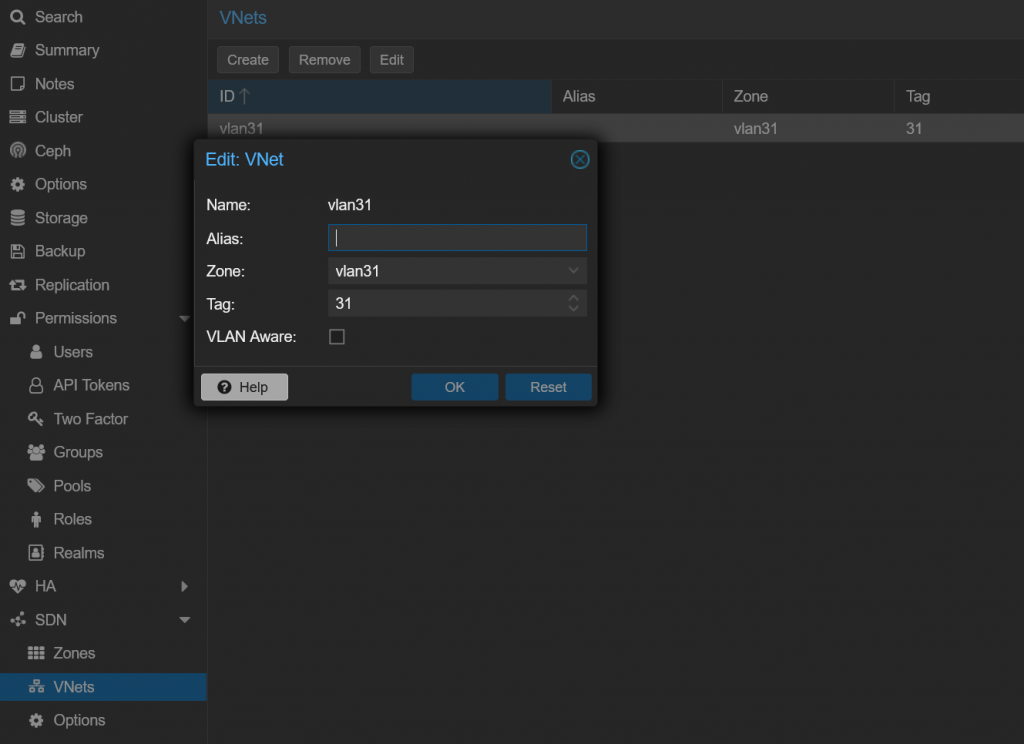
Last thing is to create a vnet. The vnet will be what VMs are actually attached to, and to create a broadcast domain. This config is simple, basically tying together a zone and give it a name a tag, which the tag ends up being the VNI.
Exploring the details
Looking on the Nokia, we can look at what the include multicast routes. As a quick overview, inclusive multicast routes are what are advertised between routers to announce the service. If two peers have RTs and a VNI match, they can build a VXLAN tunnel and exchange data.
A:KPTPE01# show router bgp routes evpn inclusive-mcast rd 192.168.254.18:2 hunt
===============================================================================
 BGP Router ID:10.11.0.2        AS:65000       Local AS:65000
===============================================================================
 Legend -
 Status codes  : u - used, s - suppressed, h - history, d - decayed, * - valid
                 l - leaked, x - stale, > - best, b - backup, p - purge
 Origin codes  : i - IGP, e - EGP, ? - incomplete

===============================================================================
BGP EVPN Inclusive-Mcast Routes
===============================================================================
-------------------------------------------------------------------------------
RIB In Entries
-------------------------------------------------------------------------------
Network        : N/A
Nexthop        : 192.168.254.18
From           : 192.168.254.18
Res. Nexthop   : 192.168.254.18
Local Pref.    : 100                    Interface Name : vlan1
Aggregator AS  : None                   Aggregator     : None
Atomic Aggr.   : Not Atomic             MED            : None
AIGP Metric    : None
Connector      : None
Community      : bgp-tunnel-encap:VXLAN target:65000:31
Cluster        : No Cluster Members
Originator Id  : None                   Peer Router Id : 192.168.254.18
Flags          : Valid  Best  IGP
Route Source   : Internal
AS-Path        : No As-Path
EVPN type      : INCL-MCAST
ESI            : N/A
Tag            : 0
Originator IP  : 192.168.254.18         Route Dist.    : 192.168.254.18:2
Route Tag      : 0
Neighbor-AS    : N/A
Orig Validation: N/A
Add Paths Send : Default
Last Modified  : 04d19h19m
-------------------------------------------------------------------------------
PMSI Tunnel Attribute :
Tunnel-type    : Ingress Replication    Flags          : Leaf not required
MPLS Label     : VNI 31
Tunnel-Endpoint: 192.168.254.18
First we can see from the communities, the encapsulation is VXLAN, and the route target. Also then the VNI, which is the tag we picked as in “31” in this case. If this router supported vxlan, we would be good to go configuring a VPLS service with VXLAN encapsulation. But some more here, and where would the fun be then?
Vyos Configuration
I will keep expanding on this, but for now the relevant configuration for the VXLAN side of this communication.
#This is the VXLAN termination interface in the same L2 as the hypervisors
    ethernet eth1 {
        address 192.168.254.137/24
        hw-id bc:24:11:51:9c:48
        mtu 9000
#Routed interface towards 7210
        vif 32 {
            address 10.0.0.7/31
            mtu 9000
        }
    }
    loopback lo {
        address 10.11.0.137/32
    }
    vxlan vxlan31 {
        ip {
            enable-directed-broadcast
        }
        mtu 9000
        parameters {
            nolearning
        }
        port 4789
        source-address 192.168.8.167
        vni 31
    }
}

protocols {
    bgp {
        address-family {
            l2vpn-evpn {
                advertise-all-vni
                advertise-svi-ip
                vni 31 {
                    route-target {
                        both 65000:31
                    }
                }
            }
        }
#7210 RR client
        neighbor 10.11.0.2 {
            address-family {
                ipv4-vpn {
                }
                l2vpn-evpn {
                }
            }
            peer-group iBGP-RR-PE
        }
      #7210 RR Client
        neighbor fc00::2 {
            address-family {
                ipv6-vpn {
                }
            }
            remote-as 65000
        }
        parameters {
            router-id 10.11.0.137
        }
        peer-group iBGP-RR-PE {
            remote-as 65000
        }
        system-as 65000
    }
#IGP towards 7210 and enable LDP
    isis {
        interface eth1.32 {
            network {
                point-to-point
            }
        }
        interface lo {
            passive
        }
        level level-1-2
        metric-style wide
        net 49.6901.1921.6800.0167.00
    }
    mpls {
        interface eth1.32
        ldp {
            discovery {
                transport-ipv4-address 10.11.0.137
            }
            interface eth1.32
            router-id 10.11.0.137
        }
    }
}
I tried to comment the import parts of the config, and to provide it all with examples. At a high level ethernet eth1 is the interface in the same vlan as the hypervisors to send vxlan traffic between the two. Ethernet1.32 is a point to point interface (just being transported over a vlan in my network) to the 7210 to run LDP over.
VPN-IPv4 Configuration
Now turning focus to the other side of Vyos, the mpls/vpn-ipv4 configuration. To recap the traffic flow will look as such:
Proxmox hypervisor <—VXLAN-> vyos (with L3 gateway for VXLAN service) <—MPLS/LDP —> 7210 with a VPRN service
Using VRRP to provide gateway redundancy between the two vyos instances for a gateway. This way if a instance goes down, the other vyos instance will still provide a valid gateway.
Bridge interface is created with the members of the vxlan31 interface, which is what defines the VNI parameters
Then the vrf configuration
Most import is defining the route target, redistribute the local interfaces, route distinguisher and to import/export using vpn routes.
Now the 7210:
A:KPTPE01# configure service vprn 231
A:KPTPE01>config>service>vprn# info
----------------------------------------------
            route-distinguisher 65000:231
            auto-bind-tunnel
                resolution any
            exit
            vrf-target target:65000:231
            interface "vlan31" create
                address 172.16.1.1/24
                sap 1/1/25:31 create
                    ingress
                    exit
                    egress
                    exit
                exit
            exit
            no shutdown
On the Nokia side, a little more simple as we are only focused with the VPN-IPv4 side of things here
RD and RT is defined
I created a L3 interface here just to have something to route to outside the interface in vyos
Review and Checks
To close out this part, let’s run some show commands and make sure the environment is ready to support some clients.
*A:KPTPE01# show router bgp summary
===============================================================================
 BGP Router ID:10.11.0.2        AS:65000       Local AS:65000
===============================================================================

BGP Summary
===============================================================================
Neighbor
Description
                   AS PktRcvd InQ  Up/Down   State|Rcv/Act/Sent (Addr Family)
                      PktSent OutQ
-------------------------------------------------------------------------------

10.11.0.137
prdkptvyos01
                65000   21466    0 06d09h28m 1/1/312 (VpnIPv4)
                        21947    0           4/0/40 (Evpn)
10.11.0.140
prdkptvyos02
                65000      10    0 00h02m24s 1/1/313 (VpnIPv4)
                          213    0           5/0/45 (Evpn)
192.168.254.13
compute3
                65000  323110    0 11d05h15m 1/0/40 (Evpn)
                       326755    0
192.168.254.18
compute2
                65000  322278    0 11d04h34m 1/0/40 (Evpn)
                       325924    0

-------------------------------------------------------------------------------
*A:KPTPE01#   show router ldp discovery

===============================================================================
LDP IPv4 Hello Adjacencies
===============================================================================
Interface Name                   Local Addr                              State
AdjType                          Peer Addr
-------------------------------------------------------------------------------

to-devkptvyos01                  10.11.0.2:0                             Estab
link                             10.11.0.137:0

to-devkptvyos02                  10.11.0.2:0                             Estab
link                             10.11.0.140:0

-------------------------------------------------------------------------------


*A:KPTPE01# show router tunnel-table

===============================================================================
IPv4 Tunnel Table (Router: Base)
===============================================================================
Destination       Owner     Encap TunnelId  Pref     Nexthop        Metric
-------------------------------------------------------------------------------
10.11.0.137/32    ldp       MPLS  65542     9        10.0.0.7       20
10.11.0.140/32    ldp       MPLS  65541     9        10.0.0.9       20
-------------------------------------------------------------------------------
Flags: B = BGP backup route available
       E = inactive best-external BGP route
===============================================================================
A:KPTPE01>config>service>vprn# show router 231 route-table protocol bgp-vpn

===============================================================================
Route Table (Service: 231)
===============================================================================
Dest Prefix[Flags]                            Type    Proto     Age        Pref
      Next Hop[Interface Name]                                    Metric
-------------------------------------------------------------------------------
172.16.0.0/24                                 Remote  BGP VPN   00h26m19s  170
       10.11.0.140 (tunneled)                                       0
-------------------------------------------------------------------------------
vyos@devkptvyos01:~$ show mpls ldp binding
AF   Destination          Nexthop         Local Label Remote Label  In Use
ipv4 10.11.0.2/32         10.11.0.2       16          131071           yes
ipv4 10.11.0.137/32       0.0.0.0         imp-null    -                 no
ipv4 10.11.0.140/32       10.11.0.2       18          131045           yes

vyos@devkptvyos01:~$ show mpls ldp neighbor
AF   ID              State       Remote Address    Uptime
ipv4 10.11.0.2       OPERATIONAL 10.11.0.2       6d10h56m

#View EVPN Type 2 Inclusive multicast routes
vyos@devkptvyos01:~$ show bgp vni all

VNI: 31

BGP table version is 1041, local router ID is 10.11.0.137
Status codes: s suppressed, d damped, h history, * valid, > best, i - internal
Origin codes: i - IGP, e - EGP, ? - incomplete
EVPN type-1 prefix: [1]:[EthTag]:[ESI]:[IPlen]:[VTEP-IP]:[Frag-id]
EVPN type-2 prefix: [2]:[EthTag]:[MAClen]:[MAC]:[IPlen]:[IP]
EVPN type-3 prefix: [3]:[EthTag]:[IPlen]:[OrigIP]
EVPN type-4 prefix: [4]:[ESI]:[IPlen]:[OrigIP]
EVPN type-5 prefix: [5]:[EthTag]:[IPlen]:[IP]

   Network          Next Hop            Metric LocPrf Weight Path
 #192.168.254.13 and .18 are proxmox hosts
 *>i[3]:[0]:[32]:[192.168.254.13]
                    192.168.254.13                100      0 i
                    RT:65000:31 ET:8
 *>i[3]:[0]:[32]:[192.168.254.18]
                    192.168.254.18                100      0 i
                    RT:65000:31 ET:8
#The two vyos routers
 *> [3]:[0]:[32]:[192.168.254.137]
                    192.168.254.137                    32768 i
                    ET:8 RT:65000:31
 *>i[3]:[0]:[32]:[192.168.254.140]
                    192.168.254.140               100      0 i
                    RT:65000:31 ET:8

vyos@devkptvyos01:~$    show ip route vrf test-vprn
Codes: K - kernel route, C - connected, S - static, R - RIP,
       O - OSPF, I - IS-IS, B - BGP, E - EIGRP, N - NHRP,
       T - Table, v - VNC, V - VNC-Direct, A - Babel, F - PBR,
       f - OpenFabric,
       > - selected route, * - FIB route, q - queued, r - rejected, b - backup
       t - trapped, o - offload failure

VRF test-vprn:
C>* 172.16.0.0/24 is directly connected, br1, 6d11h23m
B>  172.16.1.0/24 [200/0] via 10.11.0.2 (vrf default) (recursive), label 131056, weight 1, 6d11h22m
  *                         via 10.0.0.6, eth1.32 (vrf default), label 131071/131056, weight 1, 6d11h22m
I know this is a ton of data above, but what I’m trying to show is that we have the expected inclusive multicast EVPN routes from Proxmox and the Vyos instances. Then there is MPLS/LDP connectivity between vyos and the 7210. Finally in the route tables, we have a route bidirectionally between the two so in theory if hosts were to communicate between the two it should work.
This is all I have for this post. The next post I will actually enable VMs on these networks, and show the connectivity.